Instructions for e-signers

Have you received an email asking you to sign a document electronically with Visma Sign?
Electronically signed documents are just as legally valid as those signed by hand. Instead of travelling somewhere to sign in person, you can complete the signing securely online — either by using strong authentication (bank credentials or a mobile certificate) or by drawing your signature digitally. The signing method is determined by the person who sent the invitation.
Signing is always free of charge for you.
The email invitation
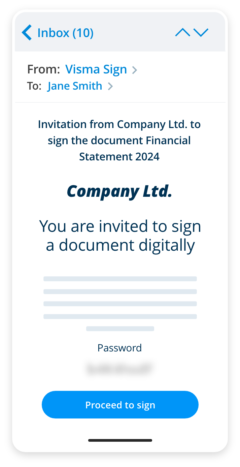
You have received an email inviting you to sign a document. The subject line starts with “Invitation to sign…”.
Open the email and make sure you keep the password included — you will need it later. Click the link in the message. The link takes you directly to the signing service.
Note:
In some cases the invitation may arrive by text message, or the link and password may be sent separately (link by email, password by SMS).
Review the document
To view the document, enter the password included in the email. You will then see a preview of the document.
If you are using a mobile browser, open the preview by selecting Preview document.
Next, check the role selector in the signing view. This defines whether you are signing as a private individual or as a representative of an organisation. If the selection is incorrect, change it before signing.
When you are ready to continue, click Proceed to signing.
Sign the document
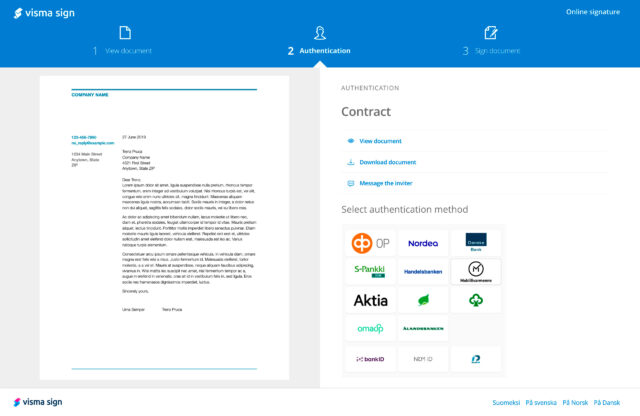
The sender will have selected the required signing method:
- Strong authentication (bank credentials or mobile certificate), or
- Digital drawn signature
Follow the on-screen instructions and complete the requested fields. Then select Sign.
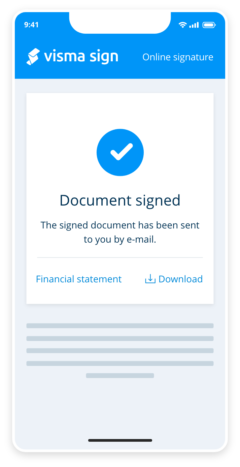
After signing, you can download the signed PDF using the secure download link provided. The link is available for 30 days, is unique to you and expires after it has been used once.
If the link has expired, you can request a new one via the original download page. A new link will be sent to you by email and is valid for 15 minutes.
Cases where the download link is not provided
If you sign on behalf of a company using strong authentication, and the company was selected from the predefined organisation list in the signing view, the document will be stored automatically in the organisation’s digital archive. In these cases, no download link is sent by email.

Visma Solutions simplifies business complexity and helps companies grow with smart cloud services. Being part of Visma Group, our mission is to help companies stay competitive.